

Closed alpha · Automated UX and visual QA

Give good workthe green light.

Vizlint reviews every page of your site at the breakpoints you choose. Each finding points to the element, the measurement, the screenshot and a suggested fix. No baseline, no test code.

Vizlint results for a scan of a sample site: an overall score, findings counted by severity, and the issues found on each page.
Two people reviewing a website together on a laptop.

01 / Who it’s for

For the weekbefore launch.

You built fast, with Cursor, Claude Code, v0 or Lovable. Before real people arrive, Vizlint checks what a careful reviewer would: text nobody can read, buttons too small to tap, copy that still says lorem ipsum.

Solo builders
One URL, one report, a list of what to fix first.
Small product teams
A shared link everyone can read before the release call.
Designers reviewing builds
Findings tied to the element, not a screenshot and a guess.

02 / How it works

From one URLto a list you can fix.

  1. 01

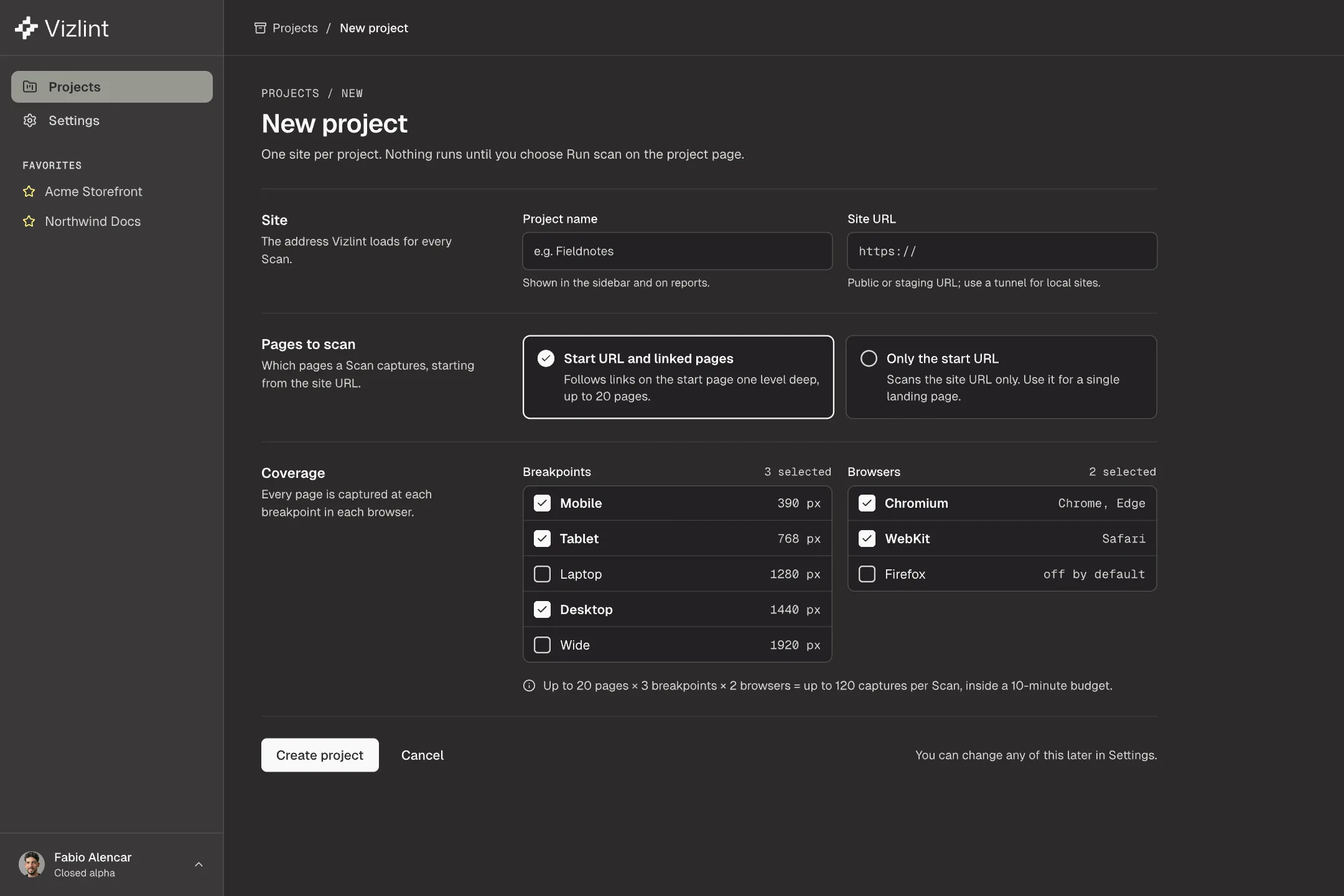
    Paste a URL

    Use a public or staging address. For a local build, open a tunnel. Pick the widths you care about and the browsers to capture.

    The new project form in Vizlint: a site URL, the widths to capture and the browsers to use.
  2. 02

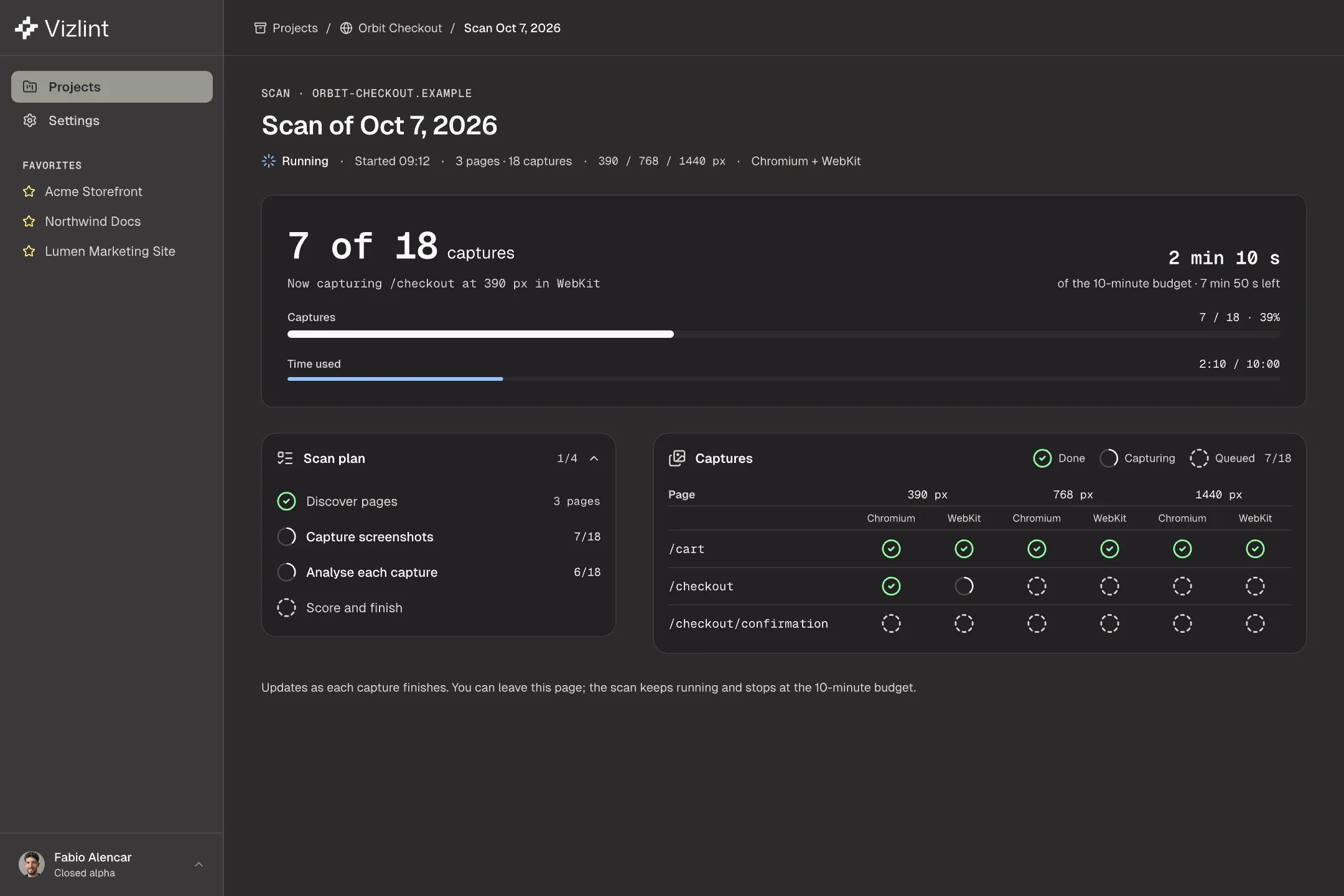
    Vizlint captures every page

    It follows the links on your page, up to 20 pages, and captures each one at every width. A scan finishes inside 10 minutes or keeps its partial results.

    A scan in progress: 7 of 18 captures done, a time budget, the scan plan and a grid of captures by page, width and browser.
  3. 03

    Fix with the evidence

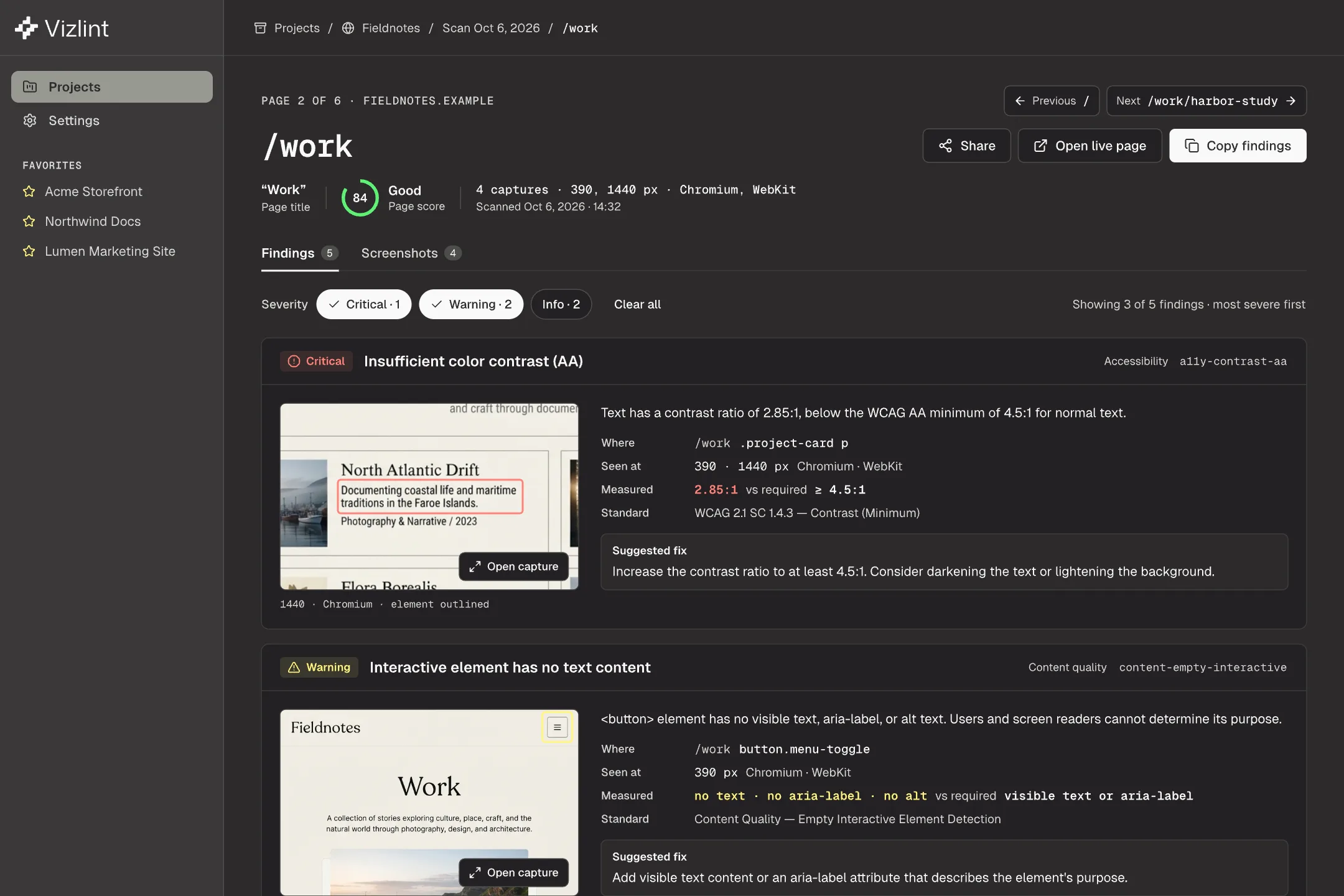
    Each finding names the element, shows the measured value next to the required one, and suggests a fix. Copy the list straight into your coding agent.

    The findings for one page, each with its severity, the element, the measured value and a suggested fix.

03 / The checks others skip

Copy that stillreads like a draft.

Most QA tools look at pixels and code. Vizlint also reads your words, on the first scan, with nothing to compare against.

  • Buzzword-heavy copy that reads as AI-generated
  • Lorem ipsum, [placeholders] and TODO markers
  • Possible misspellings and repeated words
  • The same thing called two different names
  • Buttons and links with no text
  • A second language mixed into the page
A hand marking up a printed page layout with a green highlighter.
WarningContent quality

High buzzword density suggests AI-generated copy

“Unlock seamless experiences that elevate every interaction.”
Page
/about
Element
.intro p
Captured
390 · 1440 px

Suggested fix

This text has unusually high buzzword density. Consider rewriting with more specific, authentic language.


04 / What it checks

23 checks.Three kinds of trouble.

Every check runs on every page, at every width you choose, in each browser you pick.

Content quality

  • AI-style buzzword copy
  • Placeholders, lorem ipsum, TODOs
  • Possible misspellings
  • Repeated words, double punctuation
  • Repeated content
  • Inconsistent terminology
  • Mixed languages
  • Empty buttons and links

Accessibility

  • Text contrast below WCAG AA
  • Images without alt text
  • Skipped heading levels
  • Missing landmarks and page language
  • Data tables without header cells

Layout and touch

  • Touch targets below minimum size
  • Text too small or lines too tight
  • Unexpected horizontal scroll
  • Images without width and height
  • Missing viewport meta tag
  • Tables used for layout, deprecated HTML

Captured in Chromium, WebKit and Firefox. Not real devices.

Automated checks, not an accessibility certification.

05 / The report

Share one link.Everyone reads the same list.

The report shows the score, each page, and every finding with its evidence. People you send it to don’t need an account. The site and findings in this sample are illustrative.

Open the sample report (full-size image, opens in a new tab)
A shared Vizlint report for a sample site: the overall score, the pages scanned and the findings for each, readable without signing in.
Fábio Alencar, founder of Vizlint, smiling on a sofa.

06 / Why Vizlint

“I’ve worked as a designer reviewing developer implementations and as an engineer shipping UI without a repeatable quality check. AI increased the amount of interface code, but the review process stayed manual. I built Vizlint to make those checks repeatable.”

Fábio AlencarFounder · Designer and UX engineer

07 / Questions

Before youask.

Is this an accessibility audit?

No. Vizlint runs automated checks, including contrast and alt text, but it doesn’t certify a site against WCAG. Use it to catch problems early, then review the rest by hand.

Can it scan a site on my machine?

Not directly. Vizlint needs a public or staging URL. For a local build, open a tunnel and paste the tunnel’s address.

What happens to my screenshots?

They stay with the scan in your account until you delete the scan.

What does it cost?

Nothing during the closed alpha. Pricing comes later, and we’ll tell you before anything changes.

Does it use AI to judge my site?

No. Every finding comes from a fixed rule you can read, with the measured value next to the required one.

Closed alpha

Run your first scanbefore launch day.

Vizlint is opening to a small group at a time. Until requests open here, the sample report shows what a scan finds.

See the sample report
A person with a laptop walks past a green poster on a concrete wall.